
It is always possible to change the package up or down within the current offer. It is a simple change. Just go to the service administration in Webadmin, where the option is available.
1. Log in to WebAdmin
2. Click on Website builder in the list of services.
3. In the left menu click on Service Package
4. Select the package you want and continue by clicking on “Continue to billing details”
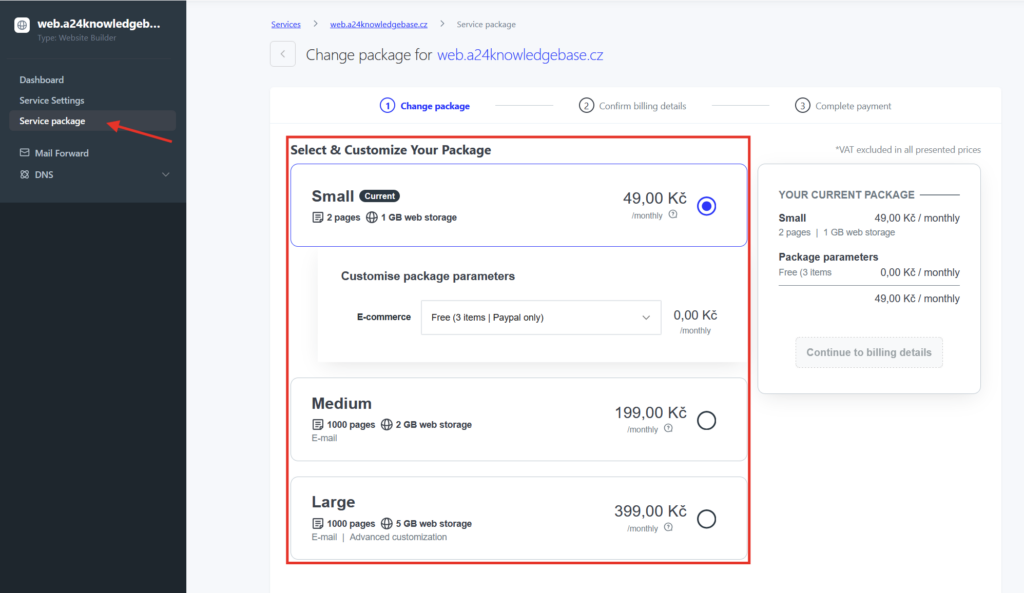
5. After checking the details, click Confirm.
Package Comparison
The difference in the offered packages is mainly in the availability of email addresses, number of subpages and storage capacity or higher interconnection with our AI. The Small and Medium packages also have an Active24 bar in the footer of the page.
| Small | Medium | Large |
| 2 subpages | 1000 subpages | 1000 subpages |
| 1 GB storage capacity | 2 GB storage capacity | 5 GB storage capacity |
| 5 MB file size limit | 100 MB file size limit | 500 MB file size limit |
| Supports 2 languages | Supports 2 languages | Unlimited languages |
| 2 backups | 2 backups | Unlimited backups |
| E-shop | E-shop | E-shop |
| – | Emails | E-mails |
| Create website using AI (beta) | Create website using AI (beta) | Create website using AI (beta) |
| | | Unlimited AI functions (beta) |
| | | HTML editing possible |
| | | Password protected pages |
| | | Header/footer editing possible |
| | | Option to turn off Active24 banner in the footer |
E-commerce
Each package includes a solution for creating an online store. A very simple e-shop for advertising a maximum of 3 products is available free of charge as part of the service. However, you can add a higher e-shop package in any solution. You can find a full overview in E-commerce packages guide.