Cron is a program running on our servers and for which you define the task and the time of execution. It can be used for example for updating database, creating regular backups, downloading specified information from internet etc.
CRON tasks are very useful tool to automatize your tasks. They can help you run a program to delete temporary files once a week and thus prevent reaching storage limit. Some programs, Drupal for example, require you to set up a cron task in order to work. Cron servers to run a script in specified time. On our servers you can create multiple types of crons. Setting up Cron can be done easily from our WebAdmin.
Creating Cron
- Log in to the WebAdmin
- Select your Domain in the Services tab
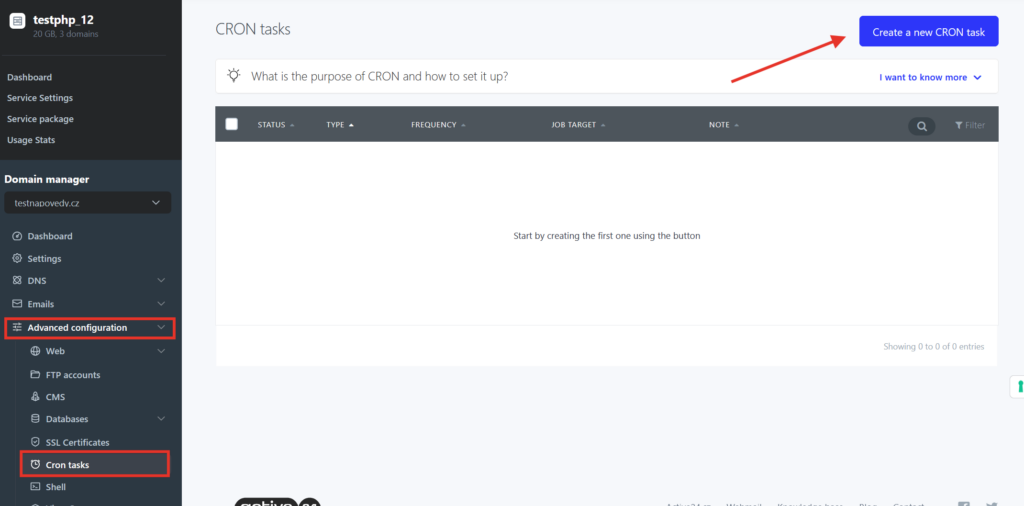
- Select Advanced configuration > Cron tasks in the left menu.
- You can add new cron by selecting Create new CRON task
Description of (WGET) Cron
1. Cron task type
Cron can run a php script located on your hosting or any URL address
- in case of http link insert the url e.g. http://domain.com/scripts/cron.php?variable=value
- in case of php script insert relative path of the php file e.g. web/scipts/cron.php (more details later in this guide)
2. Repetition
Cron is set to run a script at a specified time by selecting the time with specific cron syntax. It is set up by standard crontab unix format [minutes] [hours] [day of the month] [month] [day of the week]. To select your required time easily you can use following link: http://www.openjs.com/scripts/jslibrary/demos/crontab.php
Time examples in advanced settings
every minute
* * * * *

every 5 minutes
*/5 * * * *

every hour at 30 minute mark
30 * * * *

every day at midnight
0 0 * * *

in Sunday at noon
0 12 * * 0 or
0 12 * * 7

every workday at 12:00
0 12 * * 1,2,3,4,5
Allowed time values
- minutes: 0-59
- hours: 0-23
- day of the month: 1-31
- month: 1-12
- day of the week: 0-7 (0 and 7 is Sunday)
3. URL address
Insert URL address you wish to run by CRON task. Insert the address in similar format: http://domain.com/scripts/cron.php?key=value
4. Sending result by email?
You can receive an e-mail when the CRON task is finished. In that case set “Send results to e-mail” to “Always”. Alternatively you can select to send result only if Cron has any output to send.
5. Note
Note is for your notes or to distinguish your Cron tasks. It is visible only in WebAdmin.
6. Active task
By selecting this checkbox you will allow or deny this Cron to run.
Description of (PHP) Cron
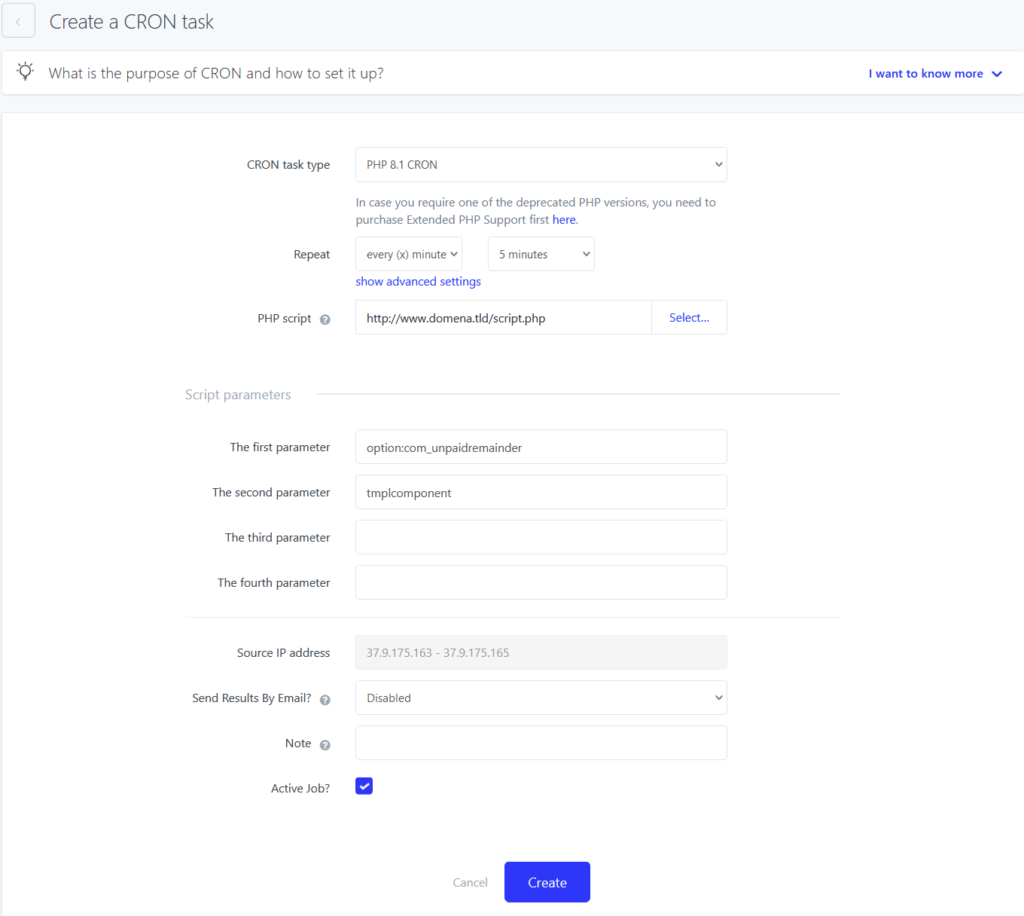
Setting repetition and allowed values is the same as with WGET Cron. Unlike the WGET Cron you can also set script parameters. It possible to set up to 4 parameters.
Example situation, example URL : https://www.domena.tld/index.php?option=com_unpaidreminder&tmpl=component&s=XxNBsQrfSr
Correctly created PHP cron will look like this: