
Each PHP version has a limited period of official support. Once support ends, it no longer receives security updates, increasing the risk of attacks on your website.
If your website is not yet running on a current PHP version, our paid Extended PHP Support service can help. It is available for shared hosting and allows you to run your website more securely on an older PHP version while you work on updating it.
Nevertheless, we recommend upgrading to a newer PHP version as soon as possible. In addition to improved security, you will benefit from better performance, new features, and compatibility with modern plugins and content management systems.
How much will the support cost?
Hosting Simple: €1 monthly without VAT
Hosting Smart: €3 monthly without VAT
Hosting Super: €5 monthly without VAT
What is PHP and how does extended support work
PHP is an open-source programming language used by platforms such as WordPress, including WooCommerce, Joomla, Drupal, and OpenCart.
New PHP versions are generally released every year and receive official support for four years. During the first two years, they receive all fixes. For the following two years, they receive critical security fixes only. Once official support ends, websites using that version face increased security risks. You can find the current support dates on the official PHP website.
Extended PHP Support allows you to run websites on selected older PHP versions that are no longer officially supported more securely on Active24 hosting. We provide additional security patches for these versions, giving you more time to update your website.
However, Extended PHP Support is not a permanent solution. We recommend upgrading to a current PHP version as soon as possible.
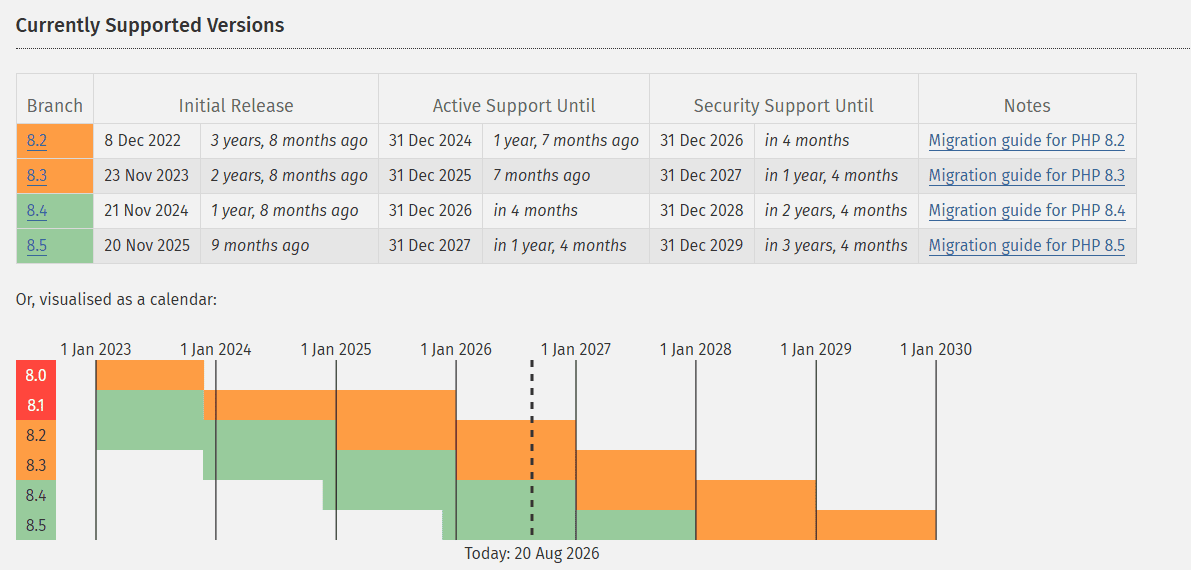
🟢 Active support: PHP 8.4 and 8.5
🟠 Critical security fixes only: PHP 8.2 and 8.3
🔴 Support ended: PHP 8.1 and older
Source: PHP.net
What version of PHP do you have?
You can find the specific address and PHP version in WebAdmin.
The quickest way to check is through the label:
Log in to WebAdmin, open the Services section, and click the label displayed next to the domain.
- Clicking the Old PHP version label will take you to an overview of addresses. The Service column shows which PHP version is configured for each website.
- The Old PHP version (CRON task) label will take you to an overview of CRON tasks that are still running on an older PHP version.
I don’t want extended PHP support, how do I turn it off?
Don’t want to use our extended PHP support? Upgrade to PHP 8.1 or later to keep your website free from security risks.
Proceed as follows:
1. Move all websites or cron jobs to PHP 8.1 or higher (see below for detailed instructions)
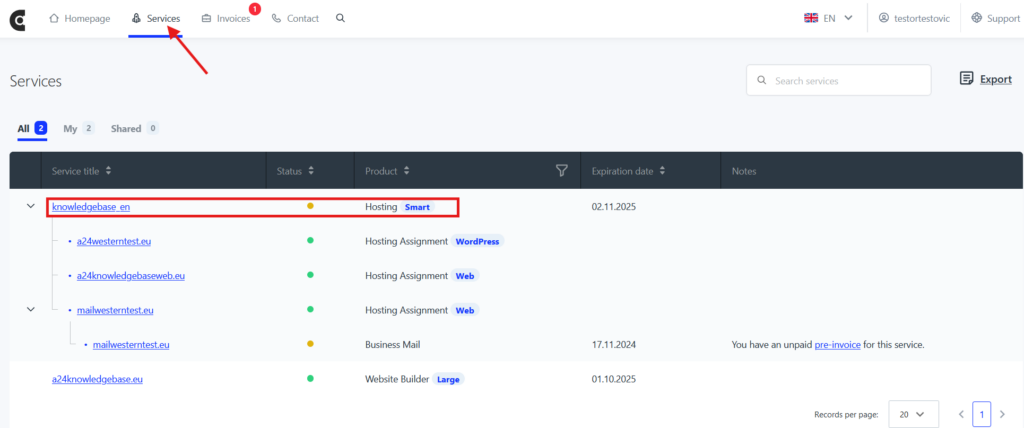
2. Log in to your Webadmin Active24 administration
3. In the overview, click on your web hosting package in the Services section
4. Click Change Package on the left side
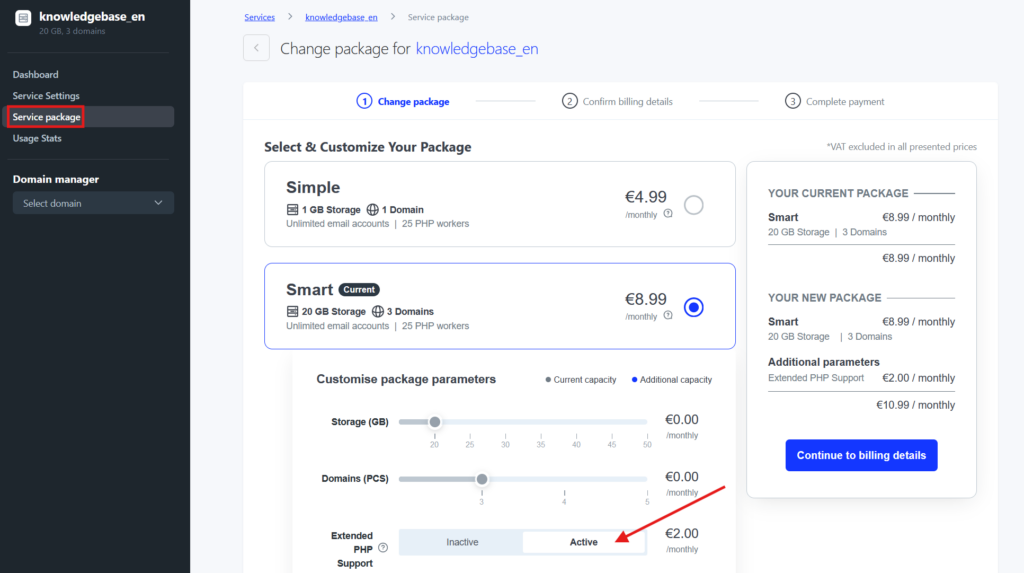
4. In the “PHP Extended Support” section, select “Inactive” and confirm the change via “Go to billing information.
This will only work if websites, redirects or cron jobs use PHP version newer than 8.1.
This will cancel the service and we will not charge you for it.
Can I upgrade to a newer version of PHP?
Absolutely! You can easily switch to the current PHP version in seconds in your Active24 Webadmin. Use this guide if you need help with updating PHP. We recommend updating to the latest PHP version, but if you don’t want to use our extended PHP support, the version must be at least PHP 8.1.

It doesn’t work what it does now?
If something does not work after changing the PHP version, switch back to the previous version. The change may take a short time to take effect, especially if you use HTTP Cache or another website caching method.
After changing the version, check your website, administration interface, forms, and other important features. If something stops working or you see an error, restore the previous PHP version. If you updated or modified any files beforehand, you can restore them from an automatic backup.
If the problem persists, the next steps depend on how your website was built:
- Custom code: We recommend contacting your developer. If you want to make the necessary changes yourself, refer to the PHP documentation.
- WordPress: We recommend updating WordPress according to this guide.
- Other content management systems: If you use Joomla, OpenCart, osCommerce, TYPO3, or PrestaShop, check the system’s documentation or support forum to verify its compatibility with newer PHP versions.
Modifications to the website itself are not included in hosting support. If the problem is related to the website’s code, theme, or content management system, we recommend contacting the website administrator or developer.