The credit system is used for faster and more flexible payments – it is the fastest form of payment. It will be appreciated mainly by companies without a payment card, or companies with a large number of services, because it is enough to use only 1 invoice in accounting – for credit top-up.
Purchasing credit
You can add credits to your account via WebAdmin. After logging into your account, click on Your Username -> Credits, where you can also see the current amount of credit. Click on Add Credit, set the required number of credits and confirm their purchase by clicking the Buy Credit button. An invoice will be generated for you, after which the credits will be allocated to your account. The original invoice for the payment of credits serves as a tax document for your accounting.
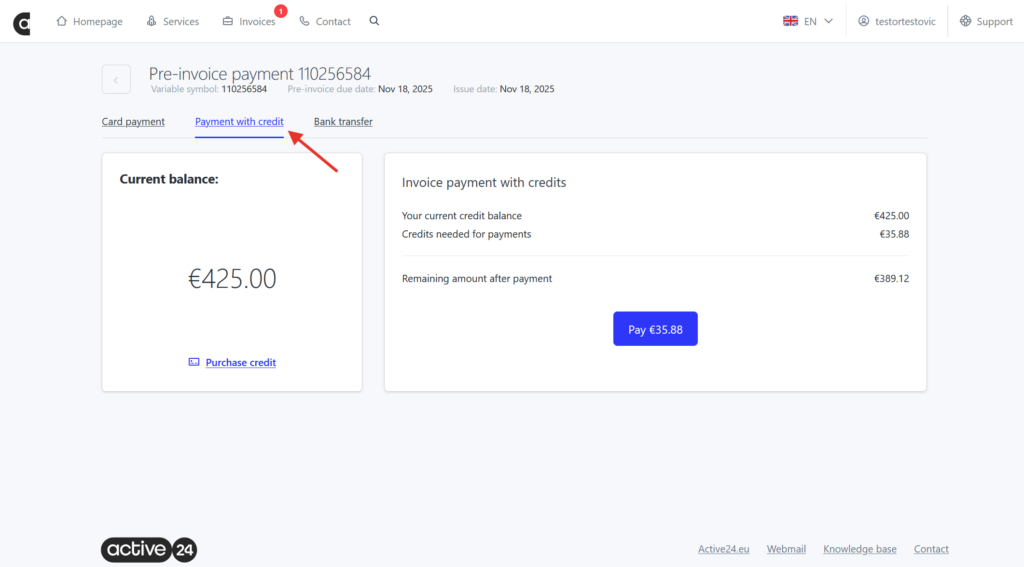
Payment is made in a similar way to paying by card, but you choose the option of paying by credit. Along with paying by card, credit can also be used for automatic payment.
Credit payment features
Credit can be set for payment either manually or automatically.
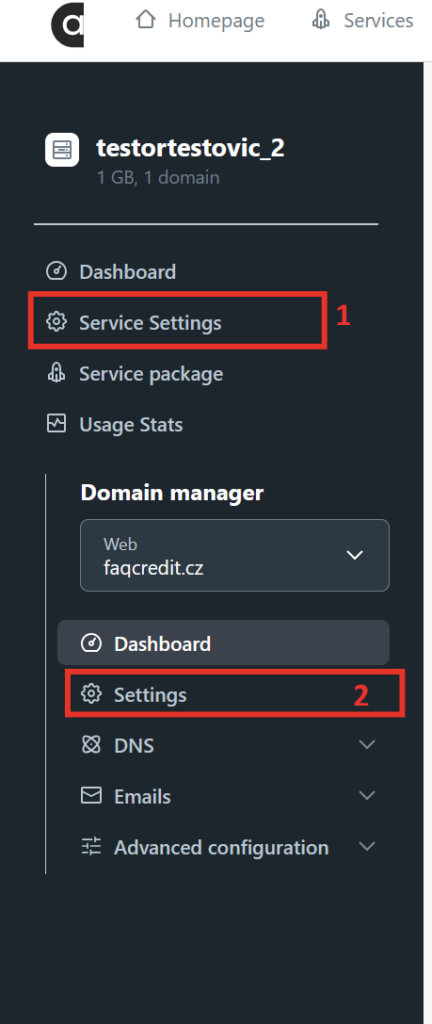
To set up automatic payment, simply go to Settings (1 – for packages) or Service Settings (2 – for domains) > Billing Settings and set where you want to use credit. Automatic payments are made on the due date of the call, i.e. 14 days from its creation.
For manual payment, simply select Pay and then Payment with credit in the issued request in the Invoices section.