Knowledge Base
  1. Home
  2. Accounts, users and extras
  3. Account administration
  4. Editing contact details
  1. Home
  2. Let's Start
  3. Transfer to new platform
  4. Editing contact details
Searching...

Editing contact details

Guide for beginners

Contact details – phone number and contact e-mail should be always up to date, because both contact information are used to identify the user as the service owner.


For security reasons there are many tasks that we are authorised to do only after being contacted via contact e-mail or number in these cases: requesting login credentials, resending of invoices, change of service parameters, change of service settings and others.

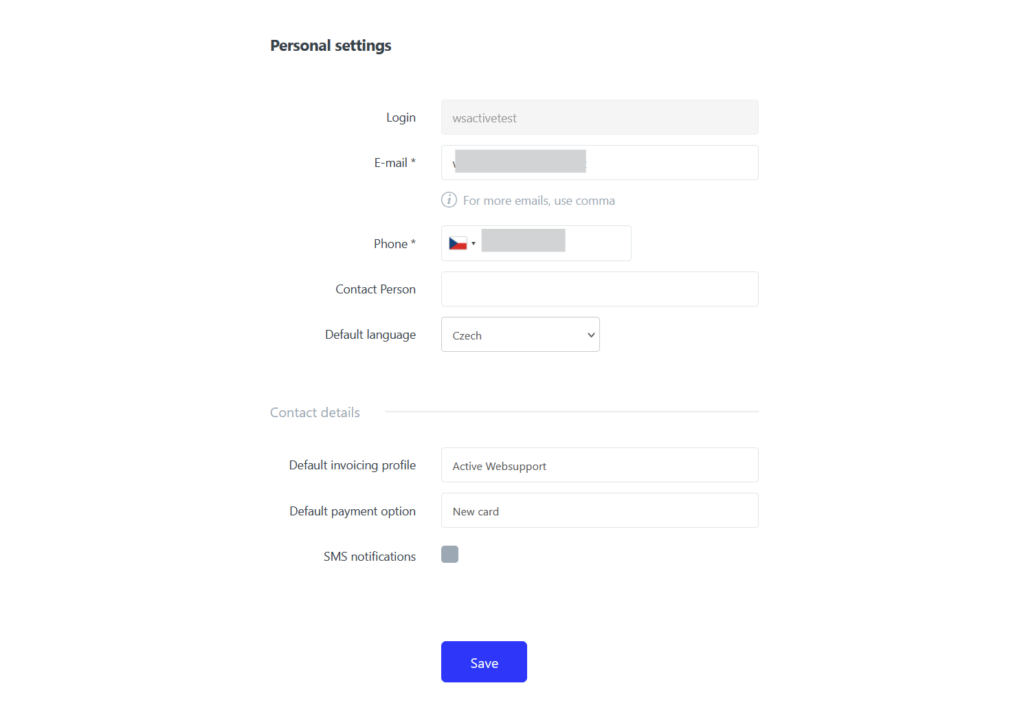
Contact details can be changed in your user profile

  1. Log in to the WebAdmin
  2. Select on the top right Username > Personal settings
  3. Edit the necessary details
  4. Save the changes

If you wish to add multiple contact e-mails to the account, you need to separate them with a comma. Adding multiple e-mails can prevent complications that may occur during unavailability of your contact e-mail, forgetting password to the e-mail etc.

Updated on September 5, 2024

Was this article helpful?

Yes No

Related Articles

  • Lost login details
  • Login via MojeID
  • Change email settings in Outlook for Windows
  • Database creation/management
  • Hosting comparison – Active24 legacy vs new platform
  • Quick DNS settings