
In a case you are interested in using more advanced options for the management of your website, we would recommend to use web console. It is almost the exact replacement for standard Linux terminal and thus is suitable for many common tasks.
- Log in to the WebAdmin
- In the Services section select your domain on which you want to enable Shell console
- Then select Advanced configuration > Shell from the left menu and then click Activate
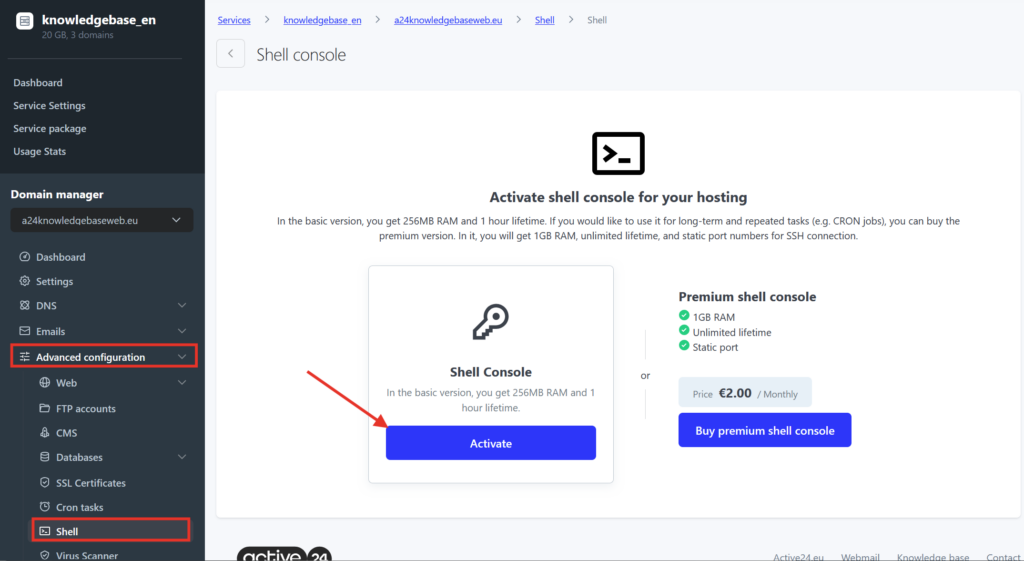
After its activation you can log in to the console straight from web browser.
All files and changes you save in your home directory and webs will be saved even for next login (including command history and other settings). Files stored outside of home directory will not be stored, they will be deleted when the console is deactivated.
Standard version of console has lifetime of 1 hour, which is enough for simple, short, one-time tasks like deleting a directory or download CMS.
For more advanced tasks like Cron jobs or deploy hooks you can use a paid version for 2,00 € without VAT/ month. Its advantages are also:
- Possibility to use 512 MB of RAM instead of 256 MB for free version
- Without automated deactivation after 1 hour
Tips for different console usage can be learned in guides:
- Creating symlink
- Downloading and extracting archives [preparing]
- Import and export of databases
If you have any comments or notes for the service (for example for installing a missing program), contact our Customer helpdesk.